Templates
WhatsApp Broadcast Template Rules Explained
What Meta checks before approving a WhatsApp template, how categories affect pricing, and the most common reasons templates get rejected.
By the Repeat Grow team · · 4 min read
Any message you broadcast to a customer who hasn't messaged you in the last 24 hours has to go through a pre-approved WhatsApp message template. Here's what actually gets checked, and why templates get rejected.
Templates are categorized, and the category affects pricing
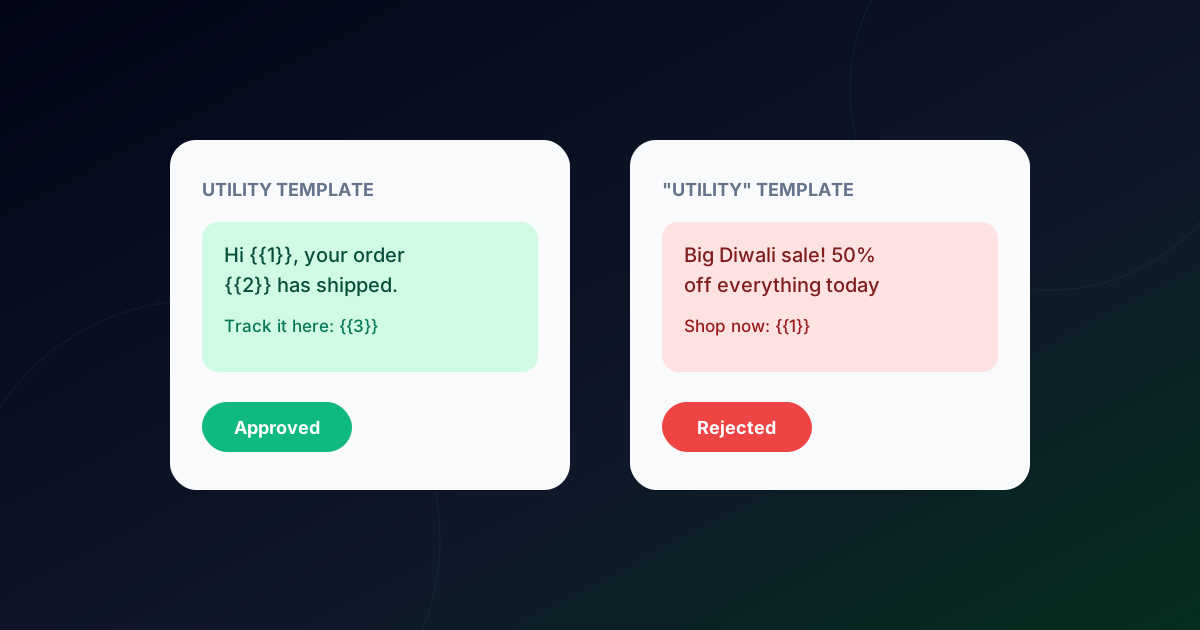
Meta classifies every template as Marketing, Utility or Authentication. A promo broadcast is Marketing; an order confirmation or shipping update is Utility; an OTP is Authentication. Meta prices messages differently by category, so miscategorizing a template (for example, dressing up a promo as a utility update) is both a rejection risk and a billing issue.
order_shipped, approvedUtility
diwali_sale, submitted as Utility, rejectedMarketing
The second one is a perfectly good Marketing template. It just can't pretend to be Utility.
Variables need realistic sample content
Templates with variables like {{1}} for a name or order number must include example values when submitted for review. Reviewers reject templates where the sample content is missing, placeholder-only, or inconsistent with the stated category. Use real-looking samples: “Priya”, “#1042”, “₹1,499”.
Common rejection reasons
- Promotional language in a template marked as Utility.
- Missing or generic variable examples.
- Asking for sensitive personal information (card numbers, passwords, ID numbers).
- A template that starts or ends with a variable, or is mostly variables.
- Content that breaks WhatsApp's commerce and business policies.
Approved templates can't be freely edited once they're live. A changed template goes back through review.
Delivery and read tracking
Once approved, each broadcast send reports delivery and read status per recipient back through the API, useful for confirming an order-update broadcast actually reached customers, not just that it was sent.
Repeat Grow's broadcast tool manages templates, variable substitution, scheduling and per-recipient tracking in one place. see pricing and plan limits for broadcast volume per plan, or read how stores use templates for Shopify order notifications.
Frequently asked questions
When do I need a WhatsApp template?
Whenever you start a conversation, or message a customer who hasn’t written to you in the last 24 hours. Inside that 24-hour window you can reply with normal free-form messages.
Can I edit a template after it is approved?
Changes to an approved template go back through review, so plan your wording before submitting. Many teams simply create a new version with a new name.
How long does template approval take?
Often minutes, sometimes a few hours. Templates that are clearly categorized and have realistic sample values are approved fastest.