WhatsApp API
WhatsApp Messaging Limits in 2026: How Many People Can You Message per Day?
How WhatsApp Business API messaging limits work in 2026: portfolio-level limits, the 250 starting limit, how to get to 2,000 and beyond, and what lowers you.
By the Repeat Grow team · · 6 min read
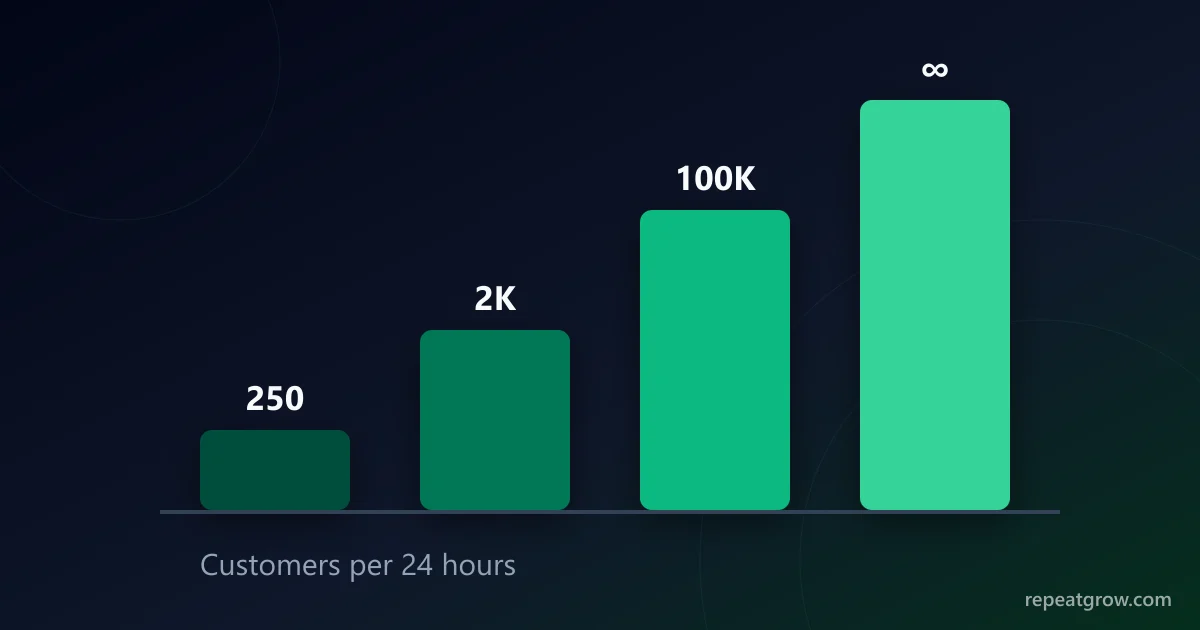
You have a list of 5,000 customers and a great Diwali offer, but WhatsApp will only let your new number reach 250 of them today. That cap is the messaging limit. Meta changed how it works in late 2025 and again in 2026, and many guides still describe the old system. Here is how limits work now and how to raise yours.
What the messaging limit counts
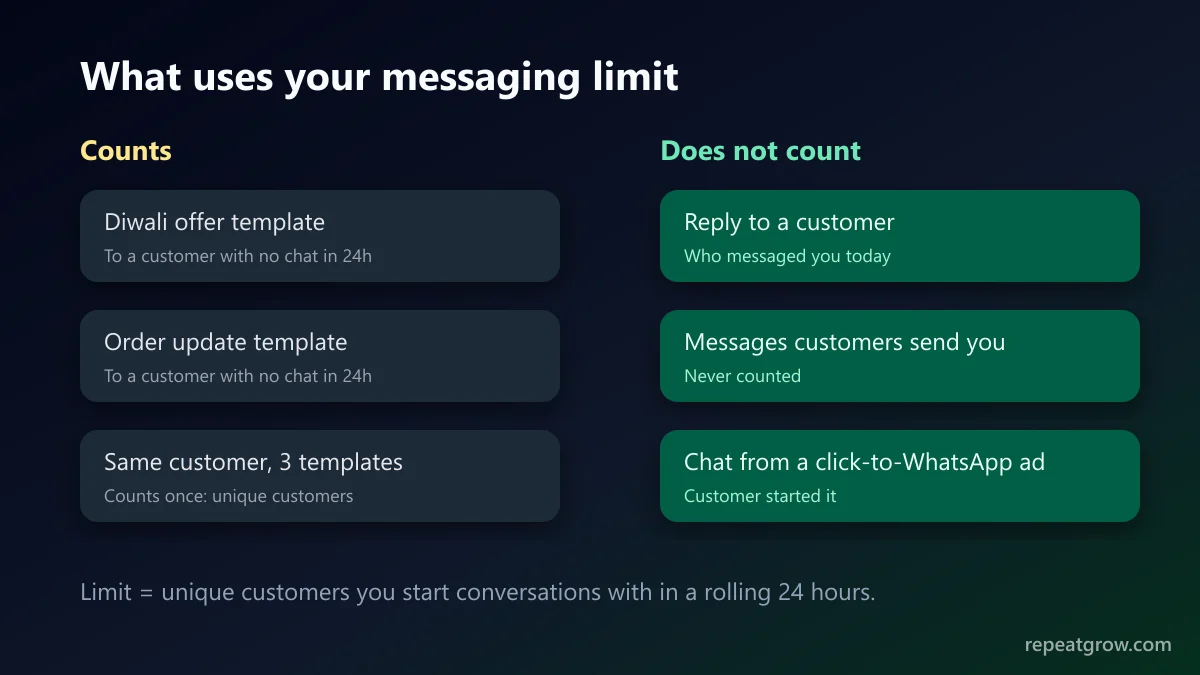
- Unique customers, not messages. Sending three templates to the same person counts once.
- A rolling 24 hours, not a calendar day.
- Only business-initiated messages: templates sent to people who have not messaged you in the last 24 hours. Replies to customers who wrote to you are not counted.
Limits now belong to your business portfolio
Limits used to be set per phone number, and each new number started from the bottom. According to Meta's messaging limits documentation, limits are now set at the business portfolio level and shared by every number in it. Adding a second number no longer means starting again at 250, and the old per-number messaging_limit_tier field in the API is deprecated.
The tiers: from 250 upwards
| Stage | Customers per 24 hours | How you get there |
|---|---|---|
| New portfolio | 250 | Default |
| First step up | 2,000 | Business verification, or Meta's quality scaling path |
| Higher tiers | Up to 100,000 and then unlimited | Automatic, when you use enough of your limit with good quality |
Several providers report that Meta has been removing intermediate tiers in 2026, so verified businesses can move to a much higher limit much faster than before. The exact tier steps are Meta's to change, so always trust the number shown in your own account over any table, including this one.
How to get past 250
- Complete Meta Business verification. This is the most reliable way up. Our step-by-step verification guide covers the documents Meta asks for.
- Or use the scaling path: send good-quality templates to enough unique customers over a short period, and Meta raises the limit without verification.
- Set a display name that matches your business and keep the profile complete (logo, description, website).
How to keep scaling
- Only message people who opted in. Blocks and spam reports are the main thing that holds limits back.
- Keep the quality rating green. Check it in WhatsApp Manager before big campaigns.
- Make templates relevant. Personalise with the customer's name and their last order. Generic blasts get blocked more.
- Give an easy way to stop. A “Stop promotions” button costs you one unsubscribe instead of one spam report.
- Ramp up gradually on a new number instead of sending the whole list on day one.
Where to see your current limit
Open WhatsApp Manager in Meta Business Suite and look at the phone number's overview, or read whatsapp_business_manager_messaging_limit from the Graph API. In Repeat Grow, the WhatsApp settings page shows your connected number, its quality rating and its status, so you can check before you schedule a broadcast.
Sending to a list bigger than your limit
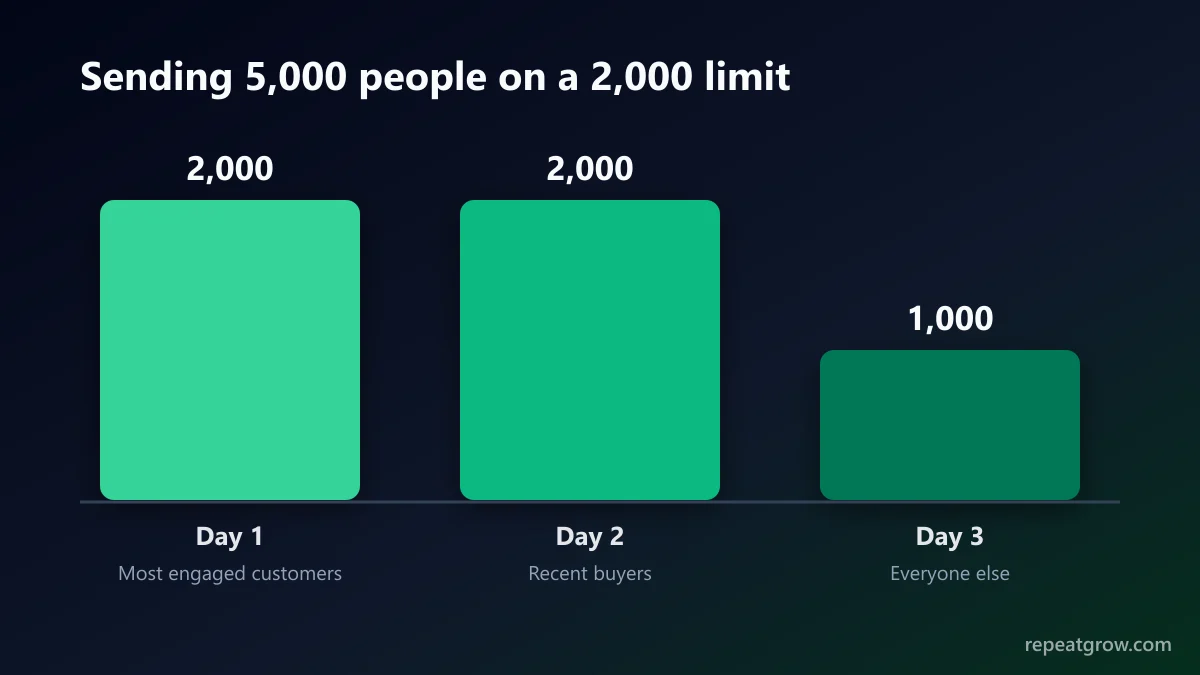
If your list is larger than your limit, split it: send to your most engaged customers first, then the rest over the next days. Good engagement on the first batch is what moves you up. Broadcasts in Repeat Grow can be scheduled and sent to segments, so a 5,000-person list can go out in batches without manual work. Read the template rules before you start, so a rejected template does not delay the campaign.
Frequently asked questions
How many WhatsApp messages can I send per day on the Business API?
The limit counts unique customers you start conversations with in a rolling 24 hours, not messages. New business portfolios start at 250. Verified businesses and those that complete Meta’s scaling path move up to higher limits automatically.
Do replies to customers count towards the limit?
No. The limit applies to business-initiated messages (templates sent to people who have not messaged you recently). Replying to customers who wrote to you does not use it.
Is the limit per phone number?
Not any more. Meta moved messaging limits to the business portfolio level, so every number in the portfolio shares the same limit.
How do I increase my WhatsApp messaging limit quickly?
Complete Meta Business verification, keep your quality rating high, and send templates to people who opted in. Once Meta’s criteria are met, the upgrade happens automatically, usually within hours.
Does a low quality rating reduce my limit?
Low quality can stop you moving up and puts templates at risk of being paused. Meta has changed how quality affects limits over time, so check the current rules on its messaging limits page.